

Blog/
Running the parking garage demo using YOLO26
A step-by-step walkthrough of the vision-rs 0.1.2 parking garage demo — YOLO26 counting occupied bays in the browser, then the same thing running on a Jetson Orin Nano.

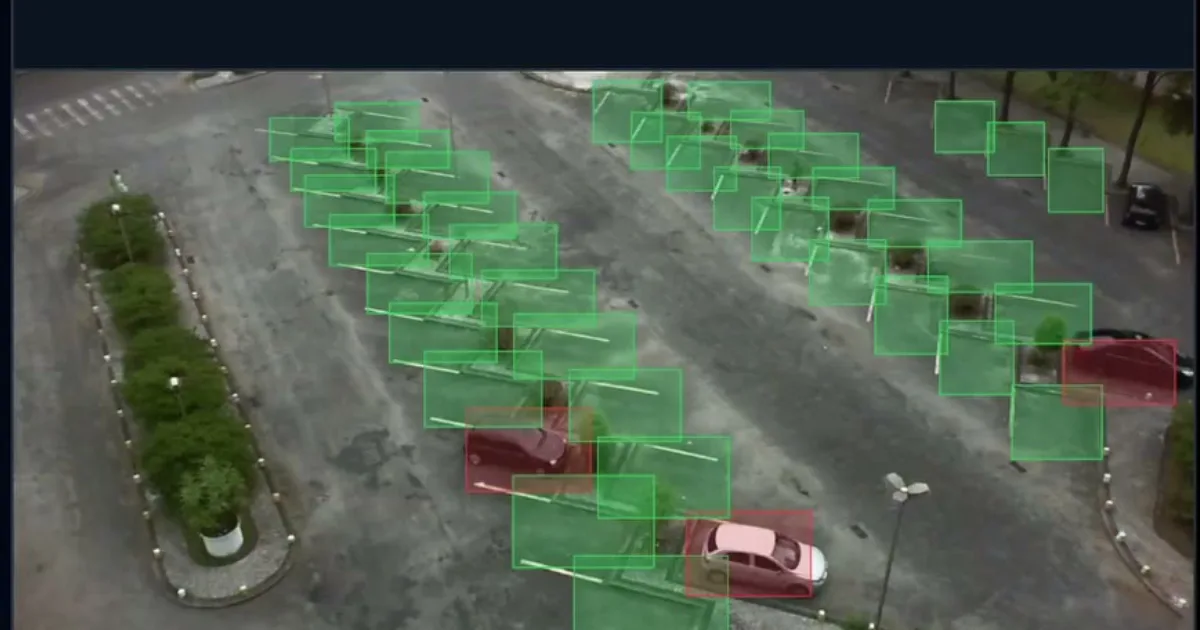
The clip on the landing page is the parking garage demo: a lot viewed from a fixed camera, every bay outlined, occupancy updating as the feed advances. This post is how to run it yourself.
It is a useful demo because it is shaped like a real deployment rather than a benchmark. Two processes, a WebSocket between them, a browser at the end, and a detection model doing work on every frame. Underneath, YOLO26-N compiled from Rust to PTX by teenygrad — no Python anywhere in the pipeline.
How it fits together:
parking-garage-serverwalks a parking-lot dataset, runs YOLO26 over each frame, decides which bays are occupied, and broadcasts a snapshot over a WebSocket every two seconds. Port 3001.parking-garage-webappserves the Vue page the browser loads. Port 3000.- The page opens a WebSocket back to the server and draws each frame with its bays overlaid.
The first eight steps run everything on a workstation. The last four put it on a Jetson Orin Nano.
Everything here is against
vision-rs at branch
release/0.1.2.
Before you start
| Requirement | Notes |
|---|---|
| Ubuntu 24.04+ | The only supported build platform right now. |
| An NVIDIA GPU | SM_86 or newer for the host path. |
| CUDA Toolkit 13.3+ | On the host, for the cuda feature and for compiling kernels. |
| Rust stable | Via rustup. |
| The PKLot dataset | Roughly 12 GB. See step 4. |
Check the two people most often get wrong:
nvcc --version
nvidia-smi
If nvcc is missing but nvidia-smi works, you have a driver but no toolkit.
Install the toolkit first — the kernel compiler needs the headers.
nvcc --version reporting 13.3+ and nvidia-smi listing the GPU.Step 1 — Clone the repository
git clone https://github.com/teenygrad/vision-rs
cd vision-rs
git checkout release/0.1.2
The demo lives in demos/parking_garage/, as a member of the vision-rs
workspace. You will build it from the repository root throughout — cargo teeny
resolves the workspace’s path dependencies and needs the root’s Cross.toml,
so it refuses to run from inside the member directory.
Step 2 — Install cargo-teeny and the teenyc toolchain
vision-rs builds on stable Rust. The GPU kernels do not — they are compiled
by teenyc, a custom compiler fork, both ahead of time and via JIT at runtime.
You need that binary before anything using the cuda feature will build, and
cuda is what makes this demo do inference at all.
You do not have to build the compiler from source. cargo-teeny fetches a
prebuilt release:
cargo install --git https://github.com/teenygrad/cargo-teeny --branch release/0.1.1
cargo teeny install-toolchain
Take the --branch seriously. Packaging this demo needs --package and
--features, and those flags only exist on release/0.1.1 — cargo-teeny’s
default branch does not have them yet, and step 10 will fail with an
unexpected argument error if you install from it.
install-toolchain downloads the compiler and rustup toolchain links it as
stable-teenyc-x86_64-unknown-linux-gnu. Verify both halves landed:
rustup toolchain list | grep teeny
rustup run stable-teenyc-x86_64-unknown-linux-gnu teenyc --version
If the first prints nothing, the link step did not happen, and every later build
fails with a missing-teenyc error rather than anything obviously
toolchain-shaped.
rustup toolchain list | grep teeny showing the linked toolchain, and teenyc --version printing a version.Step 3 — Configure the environment
Copy the template and point the cache paths wherever you want models to live:
cp .env.dev .env
export DATASETS_CACHE_DIR=$HOME/.cache/vision-rs/datasets
export MODELS_CACHE_DIR=$HOME/.cache/vision-rs/models
MODELS_CACHE_DIR is the one this demo requires — the server downloads YOLO26
weights into it on first run. Leave TEENYC_PATH commented out unless you built
your own compiler; the rustup-linked toolchain is auto-detected.
Then, in every shell you build or run from:
source .env
Forgetting this is the single most common failure. It surfaces as
MODELS_CACHE_DIR not set the moment you pass --model.
Step 4 — Get the parking lot dataset
The demo reads PKLot — a public dataset of parking lot photographs from UFPR, each image paired with an XML file marking every bay and whether it is occupied. Those XML annotations are what the demo scores itself against.
There is no downloader in the repository; fetch PKLot yourself and unpack it. What matters is the directory shape, because the server walks exactly this nesting:
<dataset_root>/
  <lot>/              # e.g. PUC, UFPR04, UFPR05
    <weather>/        # e.g. Cloudy, Rainy, Sunny
      <date>/         # e.g. 2012-09-11
        <frame>.jpg
        <frame>.xml   # same stem as the .jpg
A .jpg with no matching .xml is skipped silently, and a lot directory that
yields no usable images is skipped with a warning. If the server reports
no lots found under ..., you have pointed it one level too high or too low —
the root is the directory that contains the lot directories.
The full dataset is around 12 GB. You do not need all of it: a single lot, or even a single date directory promoted to the right depth, is enough to see the demo work.
tree -L 3 of the dataset root showing lot / weather / date nesting with paired .jpg and .xml files.Step 5 — Build the demo
Both binaries live in the parking-garage workspace member, and inference is
behind the cuda feature:
source .env
cargo build --release -p parking-garage --features cuda
The first build compiles the whole teenygrad stack and takes a while. You end up
with two binaries in target/release/: parking-garage-server and
parking-garage-webapp.
Without --features cuda the demo still builds and runs, but --model becomes
an error — you get the dataset’s ground-truth annotations replayed into the
browser and no inference at all. That is a reasonable way to check the plumbing
before involving the GPU.
cargo build --release -p parking-garage --features cuda finishing with the Finished `release` profile line.Step 6 — Start the server
source .env
./target/release/parking-garage-server /path/to/PKLot \
  --model ultralytics/yolo26n
The dataset root is positional; leave it off and it defaults to
/mnt/data1/datasets/PKLot/PKLot, which is almost certainly not where yours is.
--port moves it off 3001.
Three things happen on first run, in order, and the middle one takes a while:
- The dataset is scanned — it prints one line per lot with an image count.
- Weights are downloaded — YOLO26-N as pre-converted safetensors from
Hugging Face, cached under
$MODELS_CACHE_DIR. Only once. - Kernels are compiled — you will see
compiling YOLO26N (nc=80, 640×640) — first run builds kernel cache …. Every kernel in the network is being compiled for your specific GPU. Subsequent runs read the cache and start in seconds.
Then it settles into a two-second tick, and the API is up on
http://0.0.0.0:3001 with the WebSocket at /api/ws. There is a health check
at /api/health if you want to confirm it from another terminal.
Step 7 — Start the webapp and open it
In a second terminal, from the repository root:
./target/release/parking-garage-webapp
It listens on 0.0.0.0:3000 and serves demos/parking_garage/ui/dist. That
path is resolved relative to your working directory, so run it from the
repo root or it will serve nothing — this matters again in step 12.
Pass a different listen address as the first argument if 3000 is taken:
./target/release/parking-garage-webapp 127.0.0.1:8080
Then open http://localhost:3000.
The page connects to ws://<the host you loaded the page from>:3001/api/ws. On
one machine that resolves itself. If your server is elsewhere, or on a
non-default port, override it with a query parameter:
http://localhost:3000/?ws=ws://192.168.1.50:3001/api/ws
A status dot in the corner tells you where you stand: amber connecting, green connected with the URL beside it, red on error. It retries on its own, so starting the webapp before the server is fine.
One caveat: the page loads Vue from a CDN, so the browser needs internet access even though nothing else does.
Step 8 — Read what it is telling you
The interesting output is in the server’s terminal, not the browser. With
--model set, each tick prints a line per lot:
[ UFPR04] 2012-09-11_15_16_58.jpg gt=22/28 inf=21/28 18.4ms
gt— occupied bays according to the dataset’s XML annotation. Ground truth, hand-labelled.inf— occupied bays according to YOLO26 on this frame.ms— how long that inference took, wall clock.
The occupancy rule is deliberately simple: the model detects vehicles — COCO classes car, bus and truck — and a bay counts as occupied when the centre of any detected vehicle falls inside it. No tracking, no temporal smoothing, one frame at a time.
Watching gt and inf track each other frame to frame is the real content of
the demo. They will not always agree, and the disagreements are the interesting
part: a bay half-occluded by the vehicle in front, a motorcycle that is not one
of the three vehicle classes, a car straddling a line so its centre lands in the
neighbouring bay.
Worth being clear about one thing: the boxes drawn in the browser are the ground-truth annotations, not the detections. The comparison lives in the log.
Everything so far ran on a workstation with a CUDA toolkit and a kernel compiler installed. The rest puts the same demo on a Jetson Orin Nano that has neither.
Step 9 — Set up cross-compilation
Two one-time additions on the host:
cargo install cross --git https://github.com/cross-rs/cross
rustup target add aarch64-unknown-linux-gnu
Third, the aarch64 CUDA libraries for your board’s JetPack version. These are not your host’s CUDA — they are the cross-compilation variant, from NVIDIA’s CUDA Toolkit downloads for your JetPack release. The build mounts them into the cross container so the binary links against exactly the CUDA your Jetson runs. JetPack 6.2 puts them at:
/usr/local/cuda-12.6/targets/aarch64-linux
If yours differs, pass --cuda-path <path> on every build and package
command.
Step 10 — Package both binaries
package cross-compiles for the board and ahead-of-time compiles the GPU
kernels on the host, writing them into the bundle. That second half is the
point: there is no teenyc on a Jetson, so a binary that tried to JIT its
kernels there would fail outright.
--bin is repeatable, so the server and the webapp go into one bundle sharing a
single kernel cache:
source .env
cargo teeny package \
  --target jetson-orin-nano \
  --package parking-garage \
  --bin parking-garage-server \
  --bin parking-garage-webapp \
  --features cuda \
  --dest ./dist/parking-garage-orin \
  --device cuda \
  --options "capability=sm_87,ptx-version=82"
Run it from the repository root, not from demos/parking_garage — that is what
--package is for.
capability=sm_87 is the Orin Nano’s compute capability (Ampere).
ptx-version=82 overrides teenyc’s conservative default PTX ISA floor for
sm_87; keep it pinned unless your device is on a materially different CUDA
version.
You get:
dist/parking-garage-orin/
  bin/parking-garage-server
  bin/parking-garage-webapp
  cache/            # AOT-compiled GPU kernels, shared by both binaries
  conf/             # provenance: target, device, options, commit, build time
  data/             # empty — you populate this
The binaries find cache/ as their sibling at runtime, so nothing needs setting
on the device for kernels to resolve.
tree dist/parking-garage-orin showing both binaries under bin/, plus cache/, conf/ and data/.Step 11 — Deploy to the board
cargo teeny deploy \
  --package ./dist/parking-garage-orin \
  --host <user>@<orin-host> \
  --dest /home/<user>/parking-garage
It is rsync -a over SSH. Set up key-based auth first if you would rather not
type a password, though the interactive prompt works. A re-run copies only what
is missing, so it is safe to resume a partial transfer — pass --overwrite to
force a full re-sync after rebuilding. Use --ssh "ssh -p <port>" for a
non-default SSH port.
package bundles binaries and kernels, and nothing else. Two things the demo
needs are therefore still on your host, and you copy them yourself:
# The web UI the webapp serves — it looks for ./ui/dist relative to its cwd
rsync -a demos/parking_garage/ui <user>@<orin-host>:/home/<user>/parking-garage/

# Enough of the dataset to tick through
rsync -a /path/to/PKLot/UFPR04 <user>@<orin-host>:/home/<user>/parking-garage/data/PKLot/
Send one lot rather than all 12 GB unless you have a reason not to. Keep the lot / weather / date nesting from step 4 intact — the server walks it the same way on the device.
Step 12 — Run it on the Jetson
ssh <user>@<orin-host>
cd /home/<user>/parking-garage
export MODELS_CACHE_DIR=$HOME/.cache/vision-rs/models
./bin/parking-garage-server ./data/PKLot --model ultralytics/yolo26n
The weights download on first run and need internet on the board. If it has
none, rsync your host’s $MODELS_CACHE_DIR across instead — the layout is
identical.
In a second SSH session, from the same directory, so that ui/dist resolves:
cd /home/<user>/parking-garage
./bin/parking-garage-webapp
Then, from your laptop, open http://<orin-host>:3000. The page derives its
WebSocket URL from the host you loaded it from, so it finds the server on 3001
without configuration.
Worth pausing on what is not installed on that Jetson. No Rust. No CUDA toolkit. No Python. No ONNX runtime, no engine builder, no vendor inference server. One directory holding two binaries, their kernels, a web page and some JPEGs.
The latency figures in the server log will be higher than on your workstation — that is the point of measuring them there.
When it goes wrong
| Symptom | Cause |
|---|---|
MODELS_CACHE_DIR not set |
You did not source .env in this shell. |
no lots found under ... |
Dataset root is at the wrong depth. It must contain the lot directories. |
--model requires compiling with --features cuda |
Built without the feature. Rebuild with --features cuda. |
unexpected argument '--package' |
cargo-teeny from the wrong branch — see step 2. |
Build fails looking for teenyc |
install-toolchain did not link. Check rustup toolchain list | grep teeny. |
| Server appears to hang on first run | It is compiling every kernel. Let it finish once; the cache makes later runs fast. |
| Browser shows an empty page | The webapp was started from the wrong directory and cannot find ui/dist. |
| Status dot stays amber | Nothing is listening on 3001, or the page needs an explicit ?ws= override. |
| Kernel-not-found on the Jetson | The bundle’s cache/ was built for different --options. Re-package with the right capability. |
Where to go next
The yolo26 example in the same repository is the lower-level view of the same
model: view for an inference viewer with bounding boxes, verify for mAP over
a validation split, bench for throughput and latency across batch sizes, and
train for training on your own data. --help on any of them is accurate.
If you want the library rather than either demo, vision_rs::detect is the
entry point — an ObjectDetector/DetectorConfig pair that takes JPEG or PNG
bytes and hands back labelled, NMS-filtered detections in about ten lines. The
reference is at
docs.teenygrad.org/api/vision-rs.
And if you get stuck, the Discord is the fastest route to an answer.